
Manage external links, their display settings, and visual customization options
What is the Links Section?
The Links section provides comprehensive management tools for all external links that appear on your portal or kiosk displays. This includes adding new links, editing existing ones, deleting unwanted links, and customizing their visual appearance with background and text color settings.
The Links section is organized into multiple sub-pages, each focusing on specific aspects of link management. Users can access different link management functions through the sub-navigation menu below.
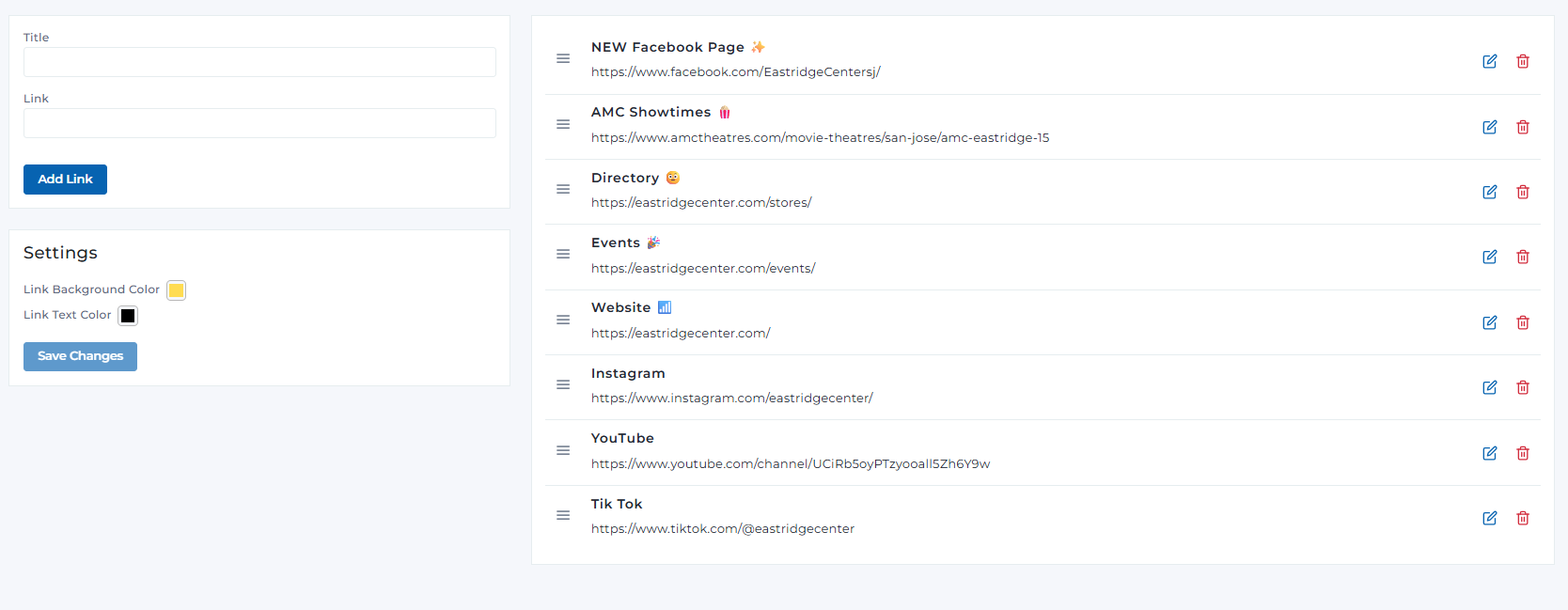
Links section overview
Links Management Sections
Key Features
Comprehensive tools for managing external links on your portal displays
Create new links with custom titles and URLs
Modify existing link titles and URLs
Remove unwanted links with safety confirmation dialogs
Best Practices
Link Management
- • Use descriptive titles that clearly indicate the link purpose
- • Include relevant emojis to make links more visually appealing
- • Keep URLs up-to-date and ensure they work correctly
- • Organize links in logical order (most important first)
- • Regularly review and remove outdated links
Visual Customization
- • Choose background colors that match your brand identity
- • Ensure text color provides good contrast for readability
- • Test colors on actual display devices if possible
- • Consider accessibility guidelines for color contrast
- • Use consistent colors across all portal elements
Content Strategy
- • Include essential links like website, directory, and events
- • Add social media links for engagement
- • Keep titles concise but descriptive
- • Update links regularly to maintain relevance
- • Monitor link performance and user engagement
Ready to Manage Links?
Access the Portal CMS to start managing your external links and customizing their appearance.
Access Portal CMS