
Create and publish news articles for your shopping center
Creating News Articles
Use the news creation form to publish articles, announcements, and updates for your shopping center. All news articles will appear on your center's website and can be shared across social media platforms.
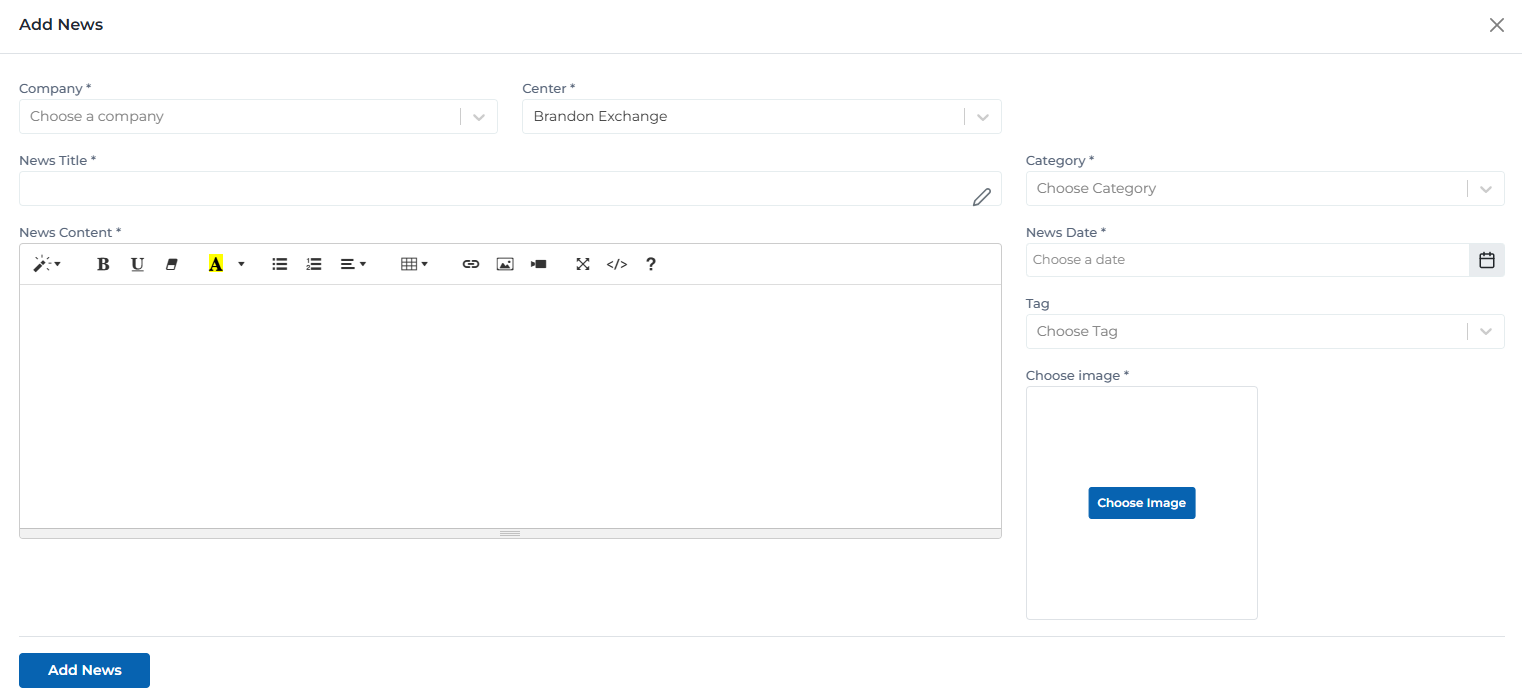
News creation form with all fields and configuration options
Key Features
- Rich Content Editor: Use the built-in rich text editor to format your content with headings, lists, links, images, and more
- Category Selection: Choose from predefined categories or create custom ones to organize your content
- Image Upload: Upload a featured image that will be displayed with your news article
- Scheduling: Set a publication date to schedule when your article should go live
Form Fields & Requirements
Understanding each field in the news creation form and what information is required.
News Title *
Choose a clear, engaging title that summarizes your news article
Category *
Select the most appropriate category for your news article
News Date *
Set the publication date for your news article
Center *
Choose which center this news article will be published for
Only visible to Company and System Managers
News Content *
Use the rich text editor to format your content with headings, paragraphs, lists, and media
Choose Image *
Upload a featured image for your news article
JPG, PNG, GIF (Max 5MB)
User Permissions & Center Selection
Different user types have different capabilities when creating news articles, particularly regarding center selection.
Creation Capabilities:
Automatically posts to their assigned center - no selection needed
Can create news articles for their assigned center only
Full access to all form fields except center selection
Step-by-Step Guide
Follow these steps to create your first news article for your shopping center.
Enter Article Details
Fill in the news title and select a category for your article
Write Your Content
Use the rich text editor to create engaging content for your news article
Add Media & Metadata
Upload a featured image and set the publication date
Review & Publish
Review your article and publish it to your center's website
Tips & Best Practices
Follow these recommendations to create engaging and effective news articles.
- •Use clear, engaging headlines that summarize your news article
- •Include relevant keywords in your title and content for better search visibility
- •Choose high-quality images that are at least 1200x630 pixels for best results
- •Use categories and tags to help visitors find your content
- •Schedule articles to be published at optimal times for your audience
Ready to Create Your News Article?
Use the form below to create and publish your first news article for your shopping center.
Create News Article