
Modify and update existing news articles for your shopping center
Editing News Articles
Use the news editing form to update existing articles, announcements, and updates. All changes will be reflected on your center's website and social media platforms.
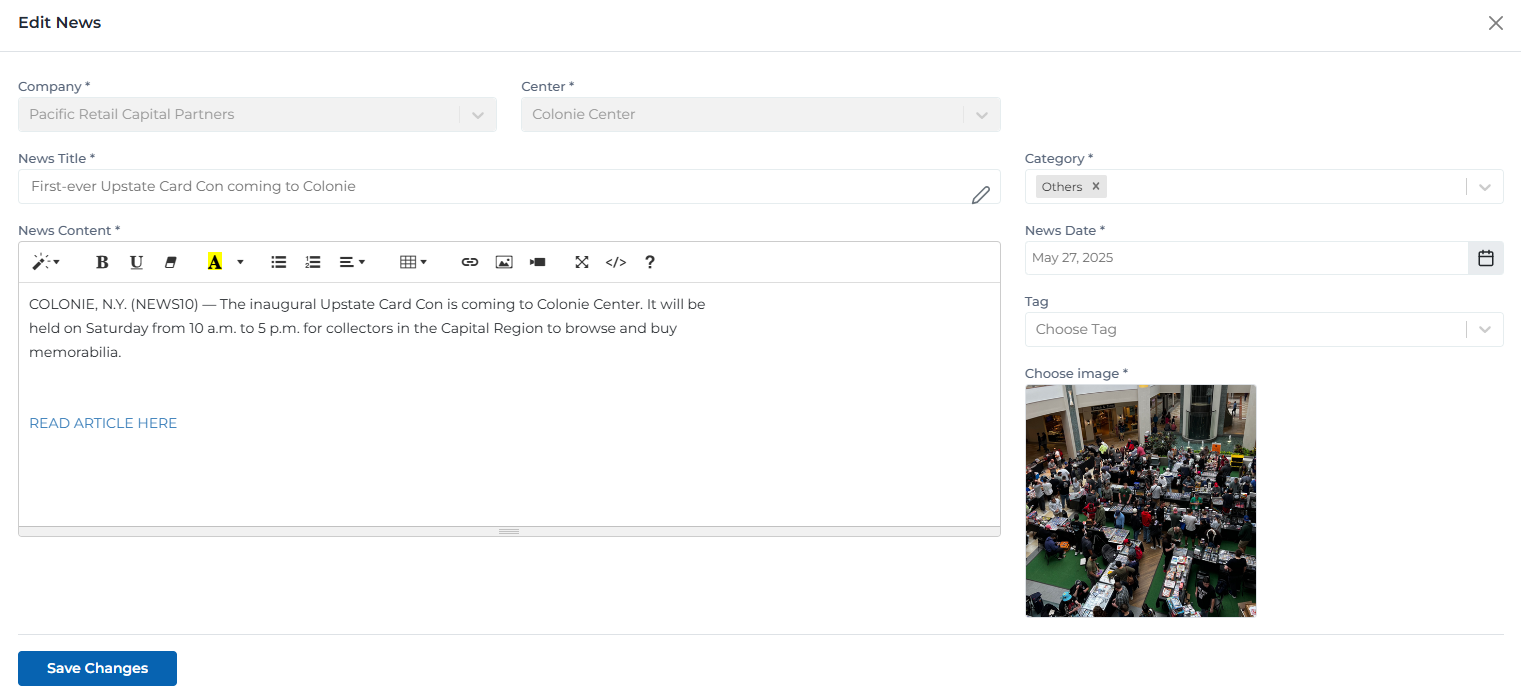
News editing form with all fields and configuration options
Key Features
- Rich Content Editor: Edit your content with the same powerful rich text editor used for creation
- Category Updates: Change the category or add new tags to better organize your content
- Image Replacement: Update the featured image or upload a new one for your article
- Scheduling Changes: Modify the publication date or schedule the article for later publication
Form Fields & Editing Options
All fields from the creation form are available for editing. Changes are saved immediately and reflected on your website.
News Title *
Choose a clear, engaging title that summarizes your news article
Category *
Select the most appropriate category for your news article
News Date *
Set the publication date for your news article
Center *
Choose which center this news article will be published for
Only visible to Company and System Managers
News Content *
Use the rich text editor to format your content with headings, paragraphs, lists, and media
Choose Image *
Upload a featured image for your news article
JPG, PNG, GIF (Max 5MB)
User Permissions & Editing Access
Different user types have varying levels of access to edit news articles based on their role and center assignments.
Editing Capabilities:
Can edit news articles for their assigned center only
Cannot change which center the article is assigned to
Full access to all form fields except center selection
Editing Tips & Best Practices
Follow these recommendations to make effective edits to your news articles.
- •Review your changes carefully before saving to ensure accuracy
- •Update the publication date if you want to change when the article appears
- •Consider updating the featured image to keep content fresh and engaging
- •Use the preview function to see how your changes will look to visitors
- •Save your work frequently to avoid losing changes
Common Types of Edits
Here are the most common reasons for editing news articles and what to consider for each.
Updating article content with new information
Keep your content fresh and accurate by updating with the latest information.
Changing the publication date or scheduling
Adjust timing to optimize when your content appears to visitors.
Adding or removing tags and categories
Improve content organization and searchability with better categorization.
Replacing the featured image
Update visuals to keep content engaging and relevant.
Fixing typos or formatting issues
Maintain professional quality by correcting errors and improving readability.
Adding links to related content
Enhance user experience by connecting related articles and resources.
Ready to Update Your News Article?
Use the form below to modify your existing news article and keep your content fresh and engaging.
Save Changes