
Manage touch interactive kiosk locations and configurations across your shopping center
How to Manage Kiosks
Kiosk Management allows you to add, edit, and configure touch interactive kiosk locations throughout your shopping center. These kiosks provide visitors with interactive access to center information, directories, and services.
Each kiosk can be assigned to specific retailers or areas, and you can manage their configurations, visibility, and functionality from this interface.
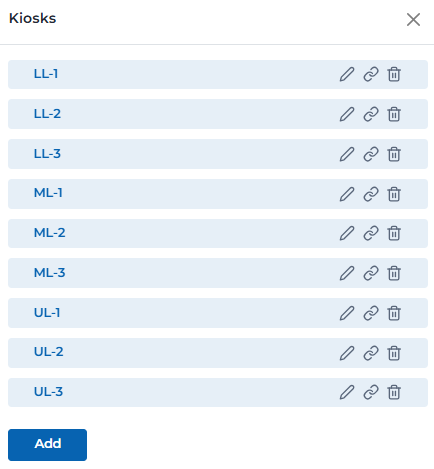
Kiosk management interface
Kiosk Management Features
Comprehensive tools for managing interactive kiosk locations:
Add new kiosk locations to the map
- • Click 'Add' button to create new kiosk
- • Select location on the interactive map
- • Assign kiosk to specific retailer or area
- • Configure kiosk settings and properties
- • Set kiosk visibility and status
Modify existing kiosk configurations
- • Click edit icon to modify kiosk settings
- • Change kiosk location on the map
- • Update retailer or area assignment
- • Modify kiosk properties and settings
- • Save changes to update kiosk configuration
Access detailed kiosk information and status
- • Click info icon to view kiosk details
- • Review kiosk configuration and settings
- • Check kiosk status and health
- • View assigned retailer or area information
- • Access kiosk usage statistics and metrics
Remove kiosk from the map and system
- • Click delete icon to remove kiosk
- • Confirm deletion to permanently remove
- • Kiosk will be removed from all map views
- • Associated data and settings will be deleted
- • Action cannot be undone once confirmed
Assign kiosks to specific retailers or areas
- • Select retailer from dropdown menu
- • Assign to specific store or area
- • Set kiosk visibility and access
- • Configure kiosk-specific settings
- • Update assignments as needed
Monitor and manage kiosk operational status
- • View real-time kiosk status
- • Enable or disable kiosk functionality
- • Monitor kiosk health and performance
- • Receive alerts for kiosk issues
- • Manage kiosk maintenance schedules
Kiosk Types & Configurations
Different types of kiosks available for your shopping center:
Primary interactive kiosks for visitor engagement
Key Features:
- • Touch screen interface for user interaction
- • Interactive center directory and maps
- • Retailer information and promotions
- • Event listings and announcements
- • Wayfinding and navigation assistance
- • Multi-language support options
Recommended Placement:
High-traffic areas, entrances, food courts, and major intersections
Basic information display kiosks
Key Features:
- • Static and dynamic information display
- • Center hours and contact information
- • Emergency information and procedures
- • Basic directory and wayfinding
- • Promotional content display
- • Weather and news updates
Recommended Placement:
Entrances, customer service areas, and waiting areas
Kiosks dedicated to specific retailers or areas
Key Features:
- • Retailer-specific information and promotions
- • Product catalogs and inventory
- • Store hours and contact details
- • Special offers and discounts
- • Customer service information
- • Appointment booking capabilities
Recommended Placement:
Near specific retailers, in store entrances, or dedicated areas
Kiosk Placement Guidelines
Best practices for optimal kiosk placement and visibility:
Place kiosks where visitors naturally congregate
- • Main entrances and exits
- • Food court and dining areas
- • Near major anchor stores
- • Intersection of major walkways
- • Customer service areas
- • Near elevators and escalators
Ensure kiosks are accessible to all visitors
- • Wheelchair accessible locations
- • Adequate clearance around kiosks
- • Proper lighting for visibility
- • Height appropriate for all users
- • Clear signage and directions
- • Alternative access methods available
Maximize kiosk visibility and discoverability
- • Clear sight lines from main walkways
- • Consistent branding and appearance
- • Adequate lighting for visibility
- • Clear directional signage
- • Avoid cluttered or busy areas
- • Regular maintenance and cleaning
Ensure proper technical setup and maintenance
- • Reliable power and network connections
- • Climate-controlled environments when possible
- • Regular software updates and maintenance
- • Backup systems for critical kiosks
- • Monitoring and alert systems
- • Security measures and protection
User Permissions & Kiosk Access
All user types have full access to kiosk management with appropriate center restrictions.
Kiosk Management Capabilities:
Can add, edit, and delete kiosks in their assigned center
Can configure kiosk properties and settings
Can assign kiosks to specific retailers or areas
Can view and monitor kiosk operational status
Best Practices
Kiosk Placement Strategy
- • Place kiosks in high-traffic areas for maximum visibility
- • Ensure kiosks are easily accessible to all visitors
- • Avoid placing kiosks in narrow or crowded areas
- • Test kiosk visibility from different angles and distances
- • Consider visitor flow patterns when placing kiosks
- • Update kiosk locations when store layouts change
Kiosk Maintenance
- • Regularly clean and maintain kiosk hardware
- • Keep software updated with latest features and security patches
- • Monitor kiosk performance and user interactions
- • Test kiosk functionality regularly
- • Have backup plans for kiosk downtime
- • Document kiosk configurations and settings
User Experience Optimization
- • Ensure kiosk interfaces are intuitive and easy to use
- • Test kiosk usability with actual visitors
- • Provide clear instructions and help information
- • Optimize content for touch screen interaction
- • Consider accessibility needs of all users
- • Gather feedback and make improvements regularly
Content Management
- • Keep kiosk content current and relevant
- • Update retailer information regularly
- • Promote current events and promotions
- • Ensure content is appropriate for all audiences
- • Test content display on different kiosk types
- • Coordinate content updates across all kiosks
Ready to Manage Your Kiosks?
Access the Portal CMS to add, configure, and manage interactive kiosks throughout your shopping center.
Access Portal CMS